Show it once. Replay it reliably.
WeftKit records you demonstrating a browser workflow once, then compiles it into a deterministic, replayable test suite — with screenshots, network evidence, and a tamper-evident log. When the UI drifts, a bounded AI repair steps in with the model you choose.
Illustrative — a stylized replay run, not a live capture
Deterministic tests, woven from a real session
Recordings, models, and repositories — woven together into test suites you can trust, audit, and version.
Record once, by hand
Demonstrate the workflow in an isolated Chromium-family browser profile. WeftKit captures each step as you perform it — no scripting session, no selector spelunking.
Deterministic replay
Compiled suites re-run the same steps, in the same order, with explicit waits. A failure means the app changed — not that the test got unlucky.
Bounded AI repair
Only after a deterministic failure, your chosen model may select from safe, locally validated recovery candidates. Free-form model output never executes.
Evidence on every run
Screenshots per step, network metadata per request, and a hash-chained event log that makes tampering evident. Reports live on your disk.
Every cent accounted
AI requests are priced from a per-model registry and recorded in a durable USD ledger, with atomic per-run holds and a monthly hard budget.
Git-native projects
Every project can be a git repository (the default). Init, clone, connect a remote, commit, and push straight from the app — your tests are code, not app state.
Seven views, one bounded workflow
These are captures of the shipped desktop build — not mockups. Every screen states what it verified and what it did not.
Everything scoped to one bounded project
The launch panel states which browser opens, which domain it may visit, how much evidence it keeps, and whether AI is available — before a capture can start.
Read the docs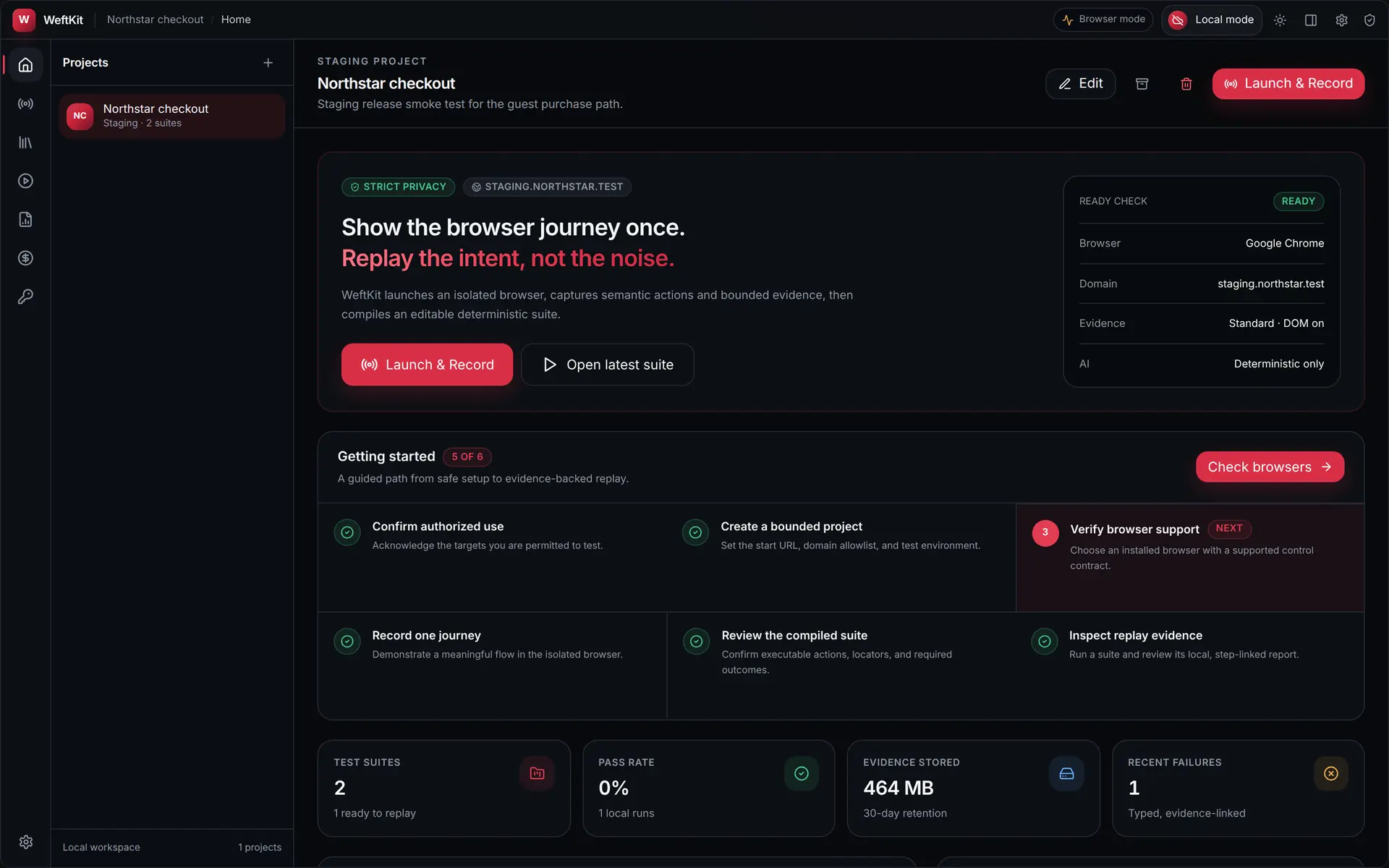
From demonstration to deterministic suite
One recording becomes a suite that replays the same way every time — and asks for help only when something really changed.
Record
Demonstrate the workflow once in an isolated, instrumented browser profile.
Compile
WeftKit turns the recording into a deterministic, editable test suite.
Replay
Suites re-run step by step with explicit waits — same input, same order, every time.
Detect drift
A step that deterministically fails halts the run and captures the failure context.
Bounded repair
Optionally, your chosen model picks from safe, pre-validated recovery candidates. Free-form output never executes.
Report & commit
Every run ends in an evidence-rich local report — commit and push it, because each project is a git repo.
Every run leaves a paper trail
A green check you can’t audit is just a feeling. WeftKit captures what actually happened on every replay and writes it to your disk — so a passing run is provable and a failing one is debuggable.
- Per-step screenshots captured at replay time
- Request and response metadata for every browser-observable network call
- A hash-chained event log that makes tampering evident
Run evidence — step 4 of 4
PassedWithRepairIllustrative — evidence is written to your disk on every run.
Know what every AI request costs — before it is sent
Every AI request is priced from a per-model registry and recorded in a durable USD ledger before transmission. Budgets are hard limits enforced up front, not warnings after the fact.
- Per-model price registry with bundled defaults and your overrides
- Unknown models priced at a $3 / $15 per-million-token fallback — never free
- Atomic per-run holds and a monthly hard budget, checked before anything is sent
AI cost ledger — this month
Illustrative ledger — deterministic replays add $0.00 rows.
Your tests live in a repository, not an app database
Every WeftKit project can be a git repository — the default. Initialize a new one, clone an existing one, or connect a remote when you create the project — then commit and push suites and reports without leaving the app.
- Init, clone, or connect a remote at project creation
- Commit and push from the app, with access tokens kept in the OS vault
- Secrets and heavy evidence are git-ignored by default
Illustrative — secrets and heavy evidence are git-ignored by default.
Bring your own model
Six API providers with your own keys, two local runtimes, three CLI agents with their own auth, and an embedded fully local engine — nothing leaves your machine unless you choose a cloud model. The model only ever selects from safe candidates — it never drives.
Frequently asked questions
Straight answers about what WeftKit does — and what it deliberately doesn’t.
You demonstrate a browser workflow once — sign in, add to cart, submit a form — inside an isolated browser profile that WeftKit controls. WeftKit compiles that recording into a deterministic, editable test suite you can replay on demand, with screenshots, network metadata, and a hash-chained event log captured on every run.
Recording and replay run in Chromium-family browsers (such as Chrome, Edge, Brave, or Chromium) using an isolated profile that never touches your personal browsing data. Firefox and Safari are detected and listed in your browser inventory, but recording and replay are not available for them today.
Only when a step deterministically fails — and only if you have enabled AI repair. The model does not drive your test. It is asked to select one of a small set of safe, locally pre-validated recovery candidates. Free-form model output is never executed, and every request is bounded in size, time, and budget.
Twelve providers: six bring-your-own-key APIs (Google Gemini, Anthropic Claude, OpenAI, DeepSeek, Qwen, and Kimi/Moonshot), two local runtimes (Ollama and LM Studio, where nothing leaves your machine with the default loopback endpoint), three CLI agents (Claude Code, Gemini CLI, and Codex, which use their own authentication), and an embedded llama.cpp engine running Gemma 3 4B fully locally — no key or account at all.
Deterministic replays cost nothing — no AI is involved. When an AI repair does run, the request is priced from a per-model price registry and recorded in a durable USD ledger before it is sent. Unknown models are priced at a $3-per-million-input plus $15-per-million-output fallback rate, and you can override the price of any model. Hard per-run and monthly budgets are enforced before anything is transmitted.
On your machine. Recordings, suites, reports, and evidence are local files, and every project can be a git repository you control — that is the default. Secrets such as passwords and API keys are stored in your operating system’s credential vault and are never sent to any AI provider. Aside from git pushes you explicitly make and optional provider sign-in, data leaves your machine only when you choose a cloud model for repair — and then only the bounded repair request.
No. WeftKit is a local-first desktop app for macOS, Windows, and Linux. Today you build it from source — there is no hosted service, no account, and no telemetry backend behind the product.
Record it once. Let WeftKit keep it honest.
A local-first desktop app for macOS, Windows, and Linux — your recordings, evidence, and keys stay on your machine.